Omarchy: What an Opinionated Linux Teaches You About Product Taste

Omarchy: What an Opinionated Linux Teaches You About Product Taste
Every developer I know has paid the over-configuration tax at least once. You set out to "just try Arch," and three evenings later you're deep in a config file arguing with yourself about gaps between tiled windows. The machine works. You've learned things. But you've also burned ten to twenty hours assembling a desktop that someone, somewhere, has already assembled a hundred times.
Omarchy is David Heinemeier Hansson's answer to that tax. I've been digging into it for a while now — not as someone who built it, and not as a daily driver evangelist, but as a product person who finds the decisions inside it more interesting than the software itself. Because underneath the tiling animations and the Tokyo Night theme, Omarchy is a case study in something most of us in product are bad at: having the nerve to decide for your user.
TL;DR
- What it is: Omarchy is an "omakase" (leave-it-to-the-chef) Linux setup from DHH — Arch Linux as the base, Hyprland as a tiling Wayland compositor, and a thick layer of curated config on top. Current release is v4.0 "Quattro."
- The pitch: It codifies the 10–20 hour Arch + Hyprland setup into an install you answer five questions for. That part is real and widely corroborated.
- The honest caveats: The "runs on any old laptop" and "installs in under 5 minutes" lines are DHH's marketing framing, not independently verified facts. I'll unpack both below — the reality is more nuanced and still pretty good.
- The 2026 hook: It now brands itself "the malleable OS for the age of agents" and ships ten AI coding-agent CLIs pre-wired. That's the part that pulled me in.
- Who it's for: Keyboard-first developers, Mac/Windows defectors, and AI-agent-heavy workflows. Not for: open-source purists, stability-first users, or Apple Silicon (x86_64 only).
What Omarchy actually is
Let's get the taxonomy right, because the naming causes most of the arguments.
Omarchy is three layers stacked and pre-configured. The base is Arch Linux, the minimal rolling-release distro that hands you a terminal and a shrug. On top sits Hyprland, a tiling, animated Wayland compositor that is genuinely beautiful and comes with, in DHH's own words, "absolutely nothing out of the box. No login screen, no menu bar, no notification system." The third layer, new in v4, is Quickshell — the construction kit that draws the top bar, launcher, notifications, and lock screen. Wrap all of that in a few thousand lines of opinionated defaults and you have Omarchy.
The philosophy is borrowed directly from DHH's 2012 essay "Rails is omakase." The chef picks the courses. You trust the taste. The official manual is refreshingly blunt about it: "There's zero bloat here: Just everything I use... It's not trying to be as familiar as possible. It's trying to be beautiful and better."
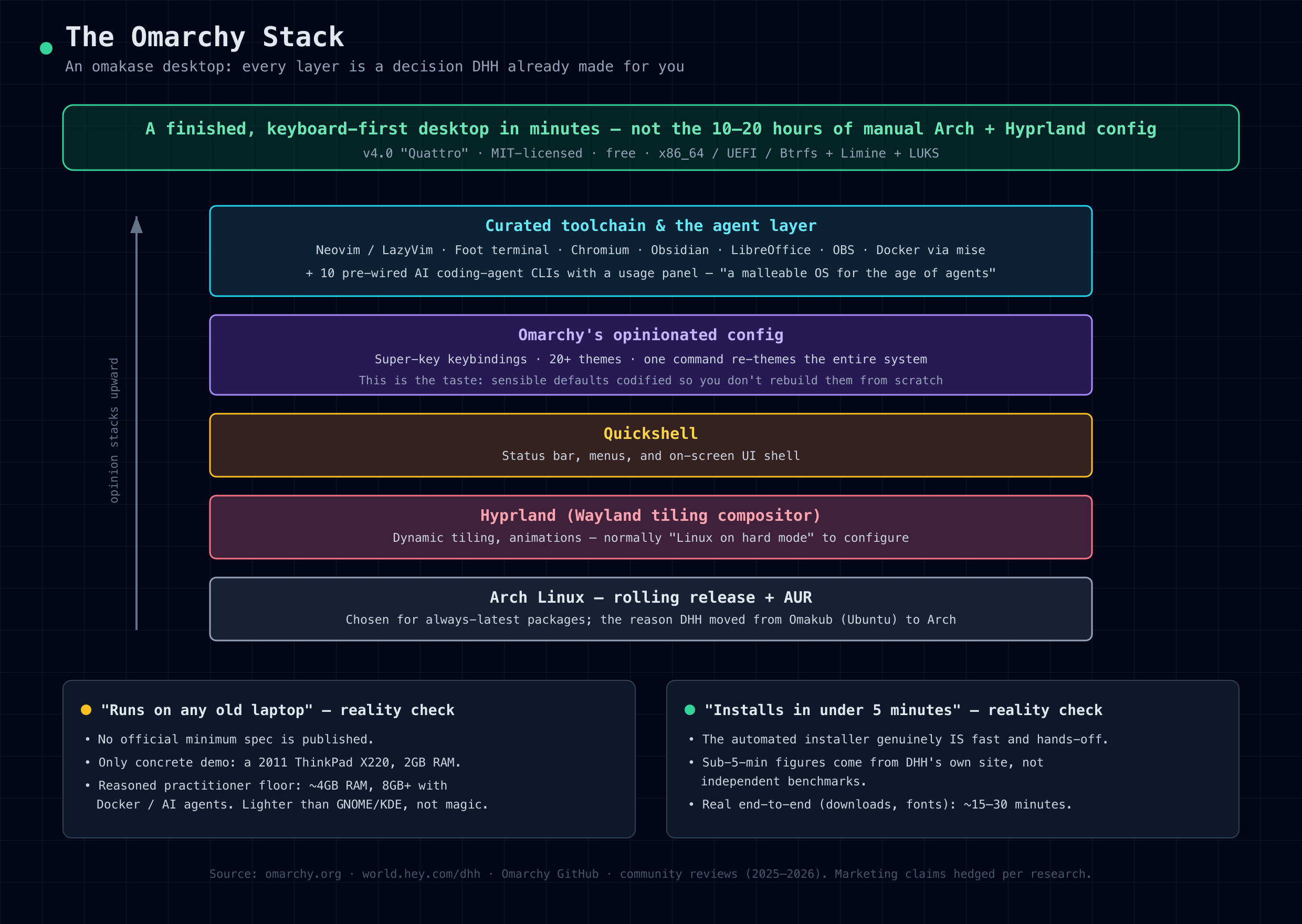
Now, the fight. Omarchy started life as a single install script that layered dotfiles and packages onto a stock Arch install. It has since grown its own ISO installer and its own package repository, which is why DHH now calls it a "distribution." Critics — and there's a well-upvoted Hacker News thread titled "Your dotfiles are not a distro" — argue that's a stretch. No kernel patches. No independent release cadence. You inherit Arch's rolling-release treadmill and the AUR supply chain, and only Arch, not DHH, runs a real security response process.
Here's how I think about that as a PM: the "is it a distro" debate is a category argument, and category arguments are usually a proxy for "I don't like how much credit this is getting." Whether you file it under distro or dotfiles doesn't change what it does for a user on a Tuesday night. What it does is collapse a long, fiddly assembly job into a decision someone already made for you. That's a product, regardless of the shelf you put it on.
It's MIT-licensed, free, no paid tier, sitting somewhere around 30,000 GitHub stars under the basecamp org. Take that star count as approximate — it's a single-source number and it moves.
The hardware reality check
This is where I want to be careful, because the folklore around Omarchy runs ahead of the facts.
You'll hear that Omarchy "runs on anything — any old laptop will handle it." I believed a version of that myself before I went looking for the source. Here's what's actually true: the project publishes no official minimum spec sheet. None. The single data point behind "runs on anything" is a line on DHH's own marketing site claiming that "even a 2011 ThinkPad X220 with 2GB of RAM can run Omarchy, with room to spare." Reviewers repeat the X220 demo, but it's exactly that — a demo, a marketing data point, not a supported daily-driver target.
So treat "runs on anything" as DHH's claim, not a benchmark. The honest practitioner version goes like this: Arch plus Hyprland is genuinely lean compared to GNOME or KDE. Idle RAM lands around 600–800MB on a well-specced machine because Hyprland leans on the GPU for compositing. So the "old hardware" story is directionally true. But the reasoned floor that reviewers converge on — not an official number — is about 4GB of RAM to be usable, and 8GB or more the moment you run the bundled Docker or point an AI agent at your codebase. A CPU with AES-NI matters too, because LUKS full-disk encryption is on by default and you'll feel it without hardware crypto.
And there's a caveat the "old laptop" romance skips: the display. Multiple real users report that Omarchy's tiling and HiDPI assumptions fight older, lower-resolution screens — a 15-inch 1080p panel, an older Dell Precision. So "any old laptop" is truer for CPU and RAM than it is for the screen you'll actually stare at. Reviving a decade-old ThinkPad can work. Enjoying it at 1366x768 is a different question.
The hard requirements are firmer and worth stating plainly, because they'll disqualify some of you immediately:
- x86_64 only. No official ARM64 build. Apple Silicon is community Asahi forks, unofficial, don't count on it.
- UEFI firmware, with Secure Boot and TPM disabled.
- Btrfs root, Limine bootloader, LUKS full-disk encryption — mandatory defaults, not options.
- A wired or USB keyboard, because Bluetooth can't type your LUKS password at boot. That one bites people.
- Roughly 32GB of unpartitioned space for a dual-boot install; a full-disk install wipes the drive.
None of that is exotic. But "runs on anything" and "requires you to disable Secure Boot and bring a wired keyboard" are two different sentences, and a good product writer should say the second one out loud.
The install reality check
The other piece of folklore is the sub-five-minute install. Again, I want to separate the marketing figure from the lived one, because both are useful if you know which is which.
DHH's site states you can be up "in as little as 35 seconds on the fastest machines, and in less than two minutes on the majority of computers." You "write the ISO to a USB stick and answer five questions. It hands back a finished desktop." The manual softens that to "under a minute on fast machines, no more than five on older ones."
The mechanism is legitimately clever. Since v3.0 the ISO is all-inclusive and offline — around 7GB that bundles the entire system, so nothing downloads during the install itself. You flash the ISO, disable Secure Boot and TPM, boot the USB, answer about five config questions, pick your drive, and wait. There's no desktop-environment chooser, on purpose. v4 "Quattro" added dual-boot installs alongside Windows and unattended fleet installs for people provisioning multiple machines.
So is it under five minutes? Here's the honest framing: every sub-five-minute figure originates from DHH's own site and manual. There are no independent benchmarks behind them. The installer's active work can genuinely be fast on good hardware with that offline ISO — that part isn't snake oil. But end-to-end, counting the USB flash, the BIOS fiddling to disable Secure Boot, and the first system update afterward, you're realistically looking at 15 to 30 minutes. DHH's own "Exiting the Mac" guide quotes "about 20 minutes to do the install," which I find more credible than the 35-second headline. And there's a well-known counter-anecdote: a live install on stream reportedly spent around 40 minutes just pulling down fonts, because the first update after a fresh install still depends on your network.
The takeaway isn't "DHH is lying." It's that "automated installer that does the heavy lifting in a few minutes" is a true and genuinely impressive claim, while "you'll be done in five minutes" is a best-case headline. If you set expectations at 20-ish minutes for your first one, you'll be happy. If you expect 35 seconds, you'll feel cheated by physics.
What ships out of the box
This is the part I actually admire, because curation is a skill and most engineers underrate it.
The v4 "Quattro" stack, as a quick map: Arch as the base, Hyprland as the window manager, Quickshell for the UI chrome, Foot as the default terminal (Alacritty, Ghostty, and Kitty are a swap away), Neovim with LazyVim as the editor, Fish with a Starship prompt, a Chromium fork tuned for web-app integration, and the Btrfs + Snapper + Limine + LUKS plumbing underneath. Runtimes come managed through mise — Rails, Node, Laravel, Docker ready to go. One note worth pinning: the terminal and shell defaults have shifted across versions (v3 docs cite Alacritty and zsh, v4 cites Foot and Fish), so don't quote them as eternal truths.
On top of that is a genuinely deep app layer: Obsidian, LibreOffice, Kdenlive, OBS, tmux, lazygit, lazydocker, Yazi, btop, native Signal, and a pile of web-app wrappers for HEY, Basecamp, ChatGPT, Grok, WhatsApp, Zoom, Discord. One-line installers exist for the commercial stuff — 1Password, Spotify, Dropbox, Tailscale.
Then there's the theming, which is the clearest expression of the whole philosophy. Twenty-plus built-in themes, Tokyo Night by default. Run omarchy theme set <name> and it re-themes the entire system at once — Hyprland, Neovim, the terminal, the bar, even some of the AI-agent UIs. That's not a wallpaper switcher. That's someone having decided that a coherent visual system is worth wiring every component to a single source of truth. Most teams I've worked with would kill for that kind of design-token discipline in their own product.
The AI-agent angle
Here's the part that ties directly to the work I care about. As of 2026, Omarchy brands itself "the malleable OS for the age of agents," and it's not just a tagline. It ships ten AI coding-agent CLIs pre-wired as lazy-loaded launchers — claude, codex, opencode, copilot, crush, grok, and others — and stays deliberately agent-neutral so you pick your default rather than having one forced on you. There's a top-bar panel that tracks your agent usage and subscription limits across machines. When something crashes, the systemd core dump gets handed to your agent for diagnosis. And an "Omarchy skill" is symlinked into the agent directories so your agent can edit the Hyprland and theme config itself.
Sit with that last one. The OS exposes its own configuration as a surface an agent is expected to manipulate. That's a different design stance than "here's a GUI for settings." It assumes the primary operator of your environment might increasingly be a model acting on your behalf, and it structures the config — plain text, version-controllable, one source of truth — so that's actually safe to do. Whether or not Omarchy is the thing that wins, that assumption is the right one to be building against. The products that treat agent-operability as a first-class concern, rather than bolting a chat box onto an existing UI, are the ones I'd bet on.
The criticism, taken seriously
A balanced read has to include the pushback, because a lot of it is fair and well-sourced.
The "dotfiles, not a distro" critique I covered — you inherit Arch's treadmill and the AUR's supply chain, with no independent security process of DHH's own. On security specifically: early versions silently enabled a third-party chaotic-aur repo via pacman -U --noconfirm, a real supply-chain concern that got removed in v2.1 once Omarchy had its own repo. A later security researcher flagged v4.0 issues — bash injection through video titles, remote code execution via notifications — some patched quickly, with defenders noting Omarchy now has a security team. I'd attribute those specifics rather than assert them as settled; they trace to a single researcher's post with partial fixes and some dispute.
The install-script style draws fire too: wget | bash piping, a bash-heavy architecture, and updates that can overwrite user dotfiles. For software explicitly targeting newcomers, that fragility is a legitimate worry. Related: because it's opinionated, updates fight your customizations — people report Waybar configs and keybindings needing migration, and there are stability anecdotes ranging from lock-screen crashes to one update bricking a system.
And the "opinionated equals bundled brand apps" complaint — Chromium, Spotify, Zoom, ChatGPT, plus 37signals' own HEY and Basecamp by default — which some read as brand promotion dressed as curation. The rebuttal is fair: a documented "Bare Mode" install exists, and unwanted apps are a one-line removal.
The strongest pro-Omarchy argument, and the one I find most honest, is the Apple analogy: critics "reduce it to raw specs while overlooking the taste and experience." Pair that with the malleability counter to the walled-garden fear — every setting is a plain text file you can edit, version, and port. "Opinionated default, unlimited overrides." That's the line that reconciles the two camps, and it's the one I'd put on the box.
Who it's for, and who it isn't
Reach for Omarchy if you want a ready-to-ship Arch + Hyprland without the config side-quest; if you're a Mac or Windows refugee curious about Linux; if you live keyboard-first and want tiling muscle memory from day one; if your work is AI-agent-heavy and that ten-CLI integration sounds like home; or if you're reviving older x86_64 hardware and can live with the display caveats.
Skip it if you're an open-source purist (even Bare Mode ships Chromium and 1Password); if you're the kind of Arch user who wants to learn by assembling it yourself, since Omarchy hides exactly the learning the Arch ethos prizes; if you need stability-first, low-maintenance computing, where a Debian-and-GNOME or Mint setup will fight you far less; if you're on Apple Silicon; or if you're in a security-conservative enterprise context that needs a mature, independent security process.
The reflective close
What stays with me about Omarchy isn't the tiling or the themes. It's the willingness to decide.
Most of what I build and review in product suffers from the opposite instinct. We add a setting rather than make a call. We ship the preferences pane because choosing a default feels like risk, and every default we skip is an argument we don't have to have internally. The result is software that technically does everything and confidently does nothing — the over-configuration tax, moved from the user's evening into the product's soul.
Omarchy's bet is that taste is a feature, that a strong default with an easy override beats a blank canvas with a manual. You can disagree with DHH's specific taste — plenty of people do, loudly — but the structure of the bet is one I keep coming back to. Opinionated default, unlimited override. Decide, but don't trap.
So here's the question I'd leave you with, whether you ever flash that USB stick or not: in the thing you're building right now, where are you charging your users the over-configuration tax because deciding felt like too much risk? And what would it take to have the nerve to be the chef instead?