The Web Developer's Guide to MCP: Connecting LLMs to Browser Tools & APIs
The Web Developer's Guide to MCP: Connecting LLMs to Browser Tools & APIs
By Mukund Murali · September 2026
If you've built web applications for any length of time, you know the pain of integrations. Every third-party API has its own auth flow, its own SDK, its own quirks. Now multiply that by the number of AI tools your team wants to connect to — Claude, ChatGPT, Copilot, Cursor, Gemini — and you've got a combinatorial nightmare. Five AI clients times fifty tools equals 250 bespoke integrations, each rotting at its own pace.
This is the problem that the Model Context Protocol (MCP) was designed to solve. And if you're a web developer who hasn't looked at it yet, now is the time. The ecosystem has crossed the threshold from "interesting experiment" to "infrastructure you should know."
What MCP Actually Is
MCP is an open protocol that standardizes how LLM applications connect to external data sources, tools, and APIs. Anthropic created it in November 2024, but it's no longer an Anthropic product — it was donated to the Linux Foundation's Agentic AI Foundation (AAIF) in December 2025, co-founded with Block and OpenAI, and backed by Google, Microsoft, AWS, Cloudflare, and Bloomberg. It's an open standard with broad industry commitment.
The best analogy I've found: MCP is to AI tools what LSP (Language Server Protocol) is to code editors. Before LSP, every editor needed custom integrations for every programming language — VS Code needed its own Python plugin, Sublime needed its own, etc. LSP standardized that interface so a single language server works with any editor. MCP does the same thing for AI-to-tool connections.
The wire format is JSON-RPC 2.0 — language-agnostic, well-understood, boring in the best way. You build one MCP server for your API, and it works with Claude, ChatGPT, Cursor, Copilot, Gemini, and any future MCP-compatible host. That's the M×N problem reduced to M+N.
Architecture: Hosts, Clients, and Servers
MCP has three distinct roles, and understanding them matters before you write any code.
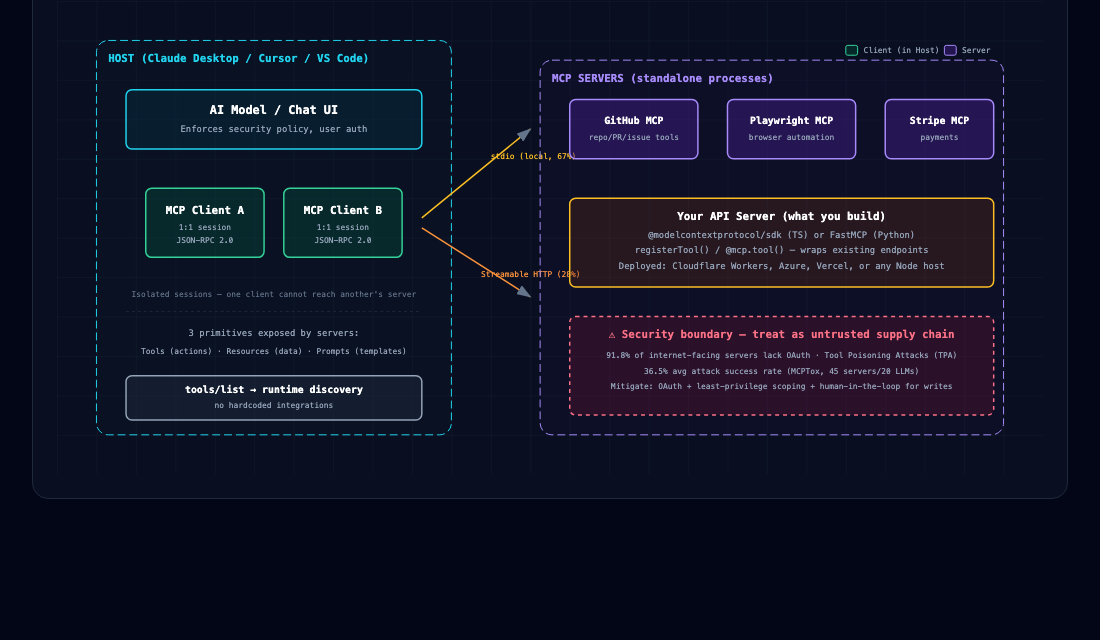
The Host is the AI application the user interacts with — Claude Desktop, Cursor, VS Code with Copilot. It creates and manages MCP clients, enforces security policies, and handles user authorization.
The Client is a connector within the host that maintains a 1:1 session with a single server. Each host typically runs multiple clients, one per connected server. The client handles protocol negotiation, message routing, and capability exchange.
The Server exposes capabilities via MCP primitives. It can run locally (as a subprocess communicating over stdio) or remotely (as an HTTP service). This is what you, as a web developer, would build.
A critical design property: each client-server connection is isolated. One server cannot reach into another server's session. This is a deliberate security boundary, and it matters more than you might think (more on security later).
The Three Primitives
MCP servers expose capabilities through three primitives:
- Tools: Executable functions the AI model can invoke —
create_issue,query_database,navigate_browser. These are the actions. - Resources: Read-only data sources providing context — file contents, database records, API responses. These are the nouns.
- Prompts: Reusable templates for structuring LLM interactions — system prompts, few-shot examples. These are less commonly used but useful for standardizing how models interact with your domain.
Transport Options
Two transport mechanisms matter today:
stdio — standard input/output for local subprocess servers. Zero network overhead. About 67% of MCP servers use this. Your server runs as a child process of the host, communicating over stdin/stdout. Great for dev tools and privacy-sensitive workloads.
Streamable HTTP — HTTP POST for client-to-server requests, with optional SSE for server-to-client streaming. About 28% of servers use this. This is the recommended transport for new remote servers and is the reason MCP feels web-native — you deploy these servers exactly like REST APIs, behind load balancers, with standard HTTP auth, on any cloud provider.
During initialization, client and server exchange supported capabilities explicitly. Neither side guesses. Old clients gracefully ignore new server features they don't understand, which makes forward compatibility straightforward.
One notable evolution: the July 2026 spec revision made the protocol stateless, removing the session ID header dependency. Any request can be served by any server instance behind a standard load balancer. This fixed the horizontal scaling headaches that stateful sessions caused in production deployments.
Building Your First MCP Server
If you know TypeScript and Node.js, you already have the skills to build an MCP server. The official @modelcontextprotocol/sdk package paired with Zod for input validation gives you a familiar developer experience.
Here's a minimal server using Streamable HTTP transport:
import { McpServer } from '@modelcontextprotocol/sdk/server/mcp.js';
import { StreamableHTTPServerTransport } from '@modelcontextprotocol/sdk/server/streamableHttp.js';
import { z } from 'zod';

const server = new McpServer({
  name: "my-web-api-server",
  version: "1.0.0"
});

// Register a tool
server.registerTool(
  "get_user",
  {
    description: 'Fetch a user by ID from the database',
    inputSchema: { id: z.string().describe("The user's ID") }
  },
  async ({ id }) => {
    const user = await db.users.findById(id);
    return { content: [{ type: "text", text: JSON.stringify(user) }] };
  }
);
That's it. You've defined a tool that any MCP-compatible AI client can discover and invoke. The description tells the model what the tool does; the input schema tells it what parameters to provide; the handler does the work.
To test it, use the MCP Inspector — think of it as DevTools for MCP servers:
npx @modelcontextprotocol/inspector node path/to/server/index.js
This gives you a web UI where you can see your server's capabilities, invoke tools manually, and debug the JSON-RPC messages flowing between client and server.
To connect your server to Claude Desktop, add it to claude_desktop_config.json:
{
  "mcpServers": {
    "my-server": {
      "command": "node",
      "args": ["path/to/server/index.js"]
    }
  }
}
Python developers have an equally clean path via FastMCP:
from mcp.server.fastmcp import FastMCP

mcp = FastMCP("MyWebAPI")

@mcp.tool()
def get_user(user_id: str) -> str:
    """Fetch a user by ID from the database."""
    user = db.users.find_by_id(user_id)
    return json.dumps(user)

@mcp.resource("users://{user_id}")
def user_resource(user_id: str) -> str:
    """Read-only user profile data."""
    return json.dumps(db.users.find_by_id(user_id))
The decorator-based pattern will feel natural to anyone who's built Flask or FastAPI routes.
Real-World Use Cases for Web Developers
Browser Automation — The Killer App
Browser automation is where MCP gets most interesting for web developers. The Playwright MCP server is the single most-searched MCP server with 82,000 monthly searches. It lets AI agents navigate web pages, fill forms, take screenshots, and extract data — all through the standard MCP interface.
Browser MCP (@browsermcp/mcp) connects AI apps to a real browser via a Chrome extension. You can configure it in one line:
{
  "mcpServers": {
    "browsermcp": {
      "command": "npx",
      "args": ["@browsermcp/mcp@latest"]
    }
  }
}
This enables scenarios that were previously painful to set up:
- AI-powered E2E testing: An agent uses Playwright MCP to navigate your web app, fill forms, and verify UI behavior — describing test scenarios in natural language instead of brittle selectors.
- Web scraping pipelines: Fetch MCP retrieves web content; the AI processes and structures it without you writing parsing logic.
- API documentation to live testing: An agent reads your OpenAPI spec via a resource, then calls your endpoints via tools, finding bugs you'd miss in manual testing.
Production API Integrations
The major platforms have shipped official MCP servers: GitHub (889K downloads, full repo/PR/issue integration), Stripe (payment operations), Sentry (error monitoring via Streamable HTTP), Figma (design file access), Atlassian (Jira/Confluence), and more.
What makes this practical: an AI agent can compose multiple MCP servers in a single workflow. Read from a Postgres database, process with browser automation, create a GitHub issue from the results, and post a summary to Slack — each step hitting a different MCP server, all orchestrated by the same AI host.
MCP vs. Function Calling: When to Use Which
This is the question I hear most from web developers who've used OpenAI's function calling or Anthropic's tool use. The short answer: they're complementary, not competitive.
Function calling is how a single LLM invokes tools you define at request time. You send tool definitions alongside your prompt, the model decides to call one, and you execute it. It's provider-specific — OpenAI functions aren't the same as Anthropic tools.
MCP is how any LLM discovers and connects to tools that exist as standalone services. The tools live in separate server processes, are discovered at runtime via tools/list, and work with any MCP-compatible client.
| Dimension | Function Calling | MCP |
|---|---|---|
| Scope | Single LLM provider's API | Cross-provider open protocol |
| Discovery | Developer defines tools at request time | Runtime discovery via tools/list |
| Portability | Provider-locked | Universal — same server, any client |
| Transport | Embedded in chat API | Independent protocol (stdio, HTTP) |
| Ecosystem | Per-provider tool libraries | 25,000+ shared servers |
| Composability | One provider's tools per request | Multiple servers simultaneously |
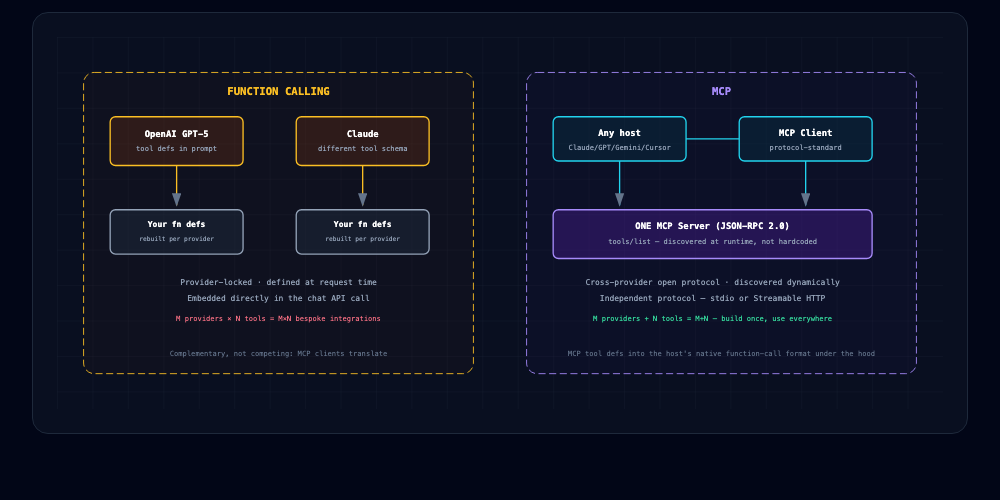
Under the hood, MCP clients typically translate MCP tool definitions into the host LLM's native function-calling format. So MCP doesn't replace function calling — it provides the discovery and connectivity layer that sits above it.
Use function calling when you have a small, fixed set of tools tightly coupled to one LLM provider. Use MCP when you want your tools to be portable, discoverable, and usable across multiple AI clients.
Security: The Elephant in the Room
I want to be direct about this because too many MCP tutorials skip it: the security landscape for MCP is rough.
Tool Poisoning Is Real
Tool Poisoning Attacks (TPA) are a new attack class with no direct analogue in traditional web security. A malicious MCP server embeds hidden instructions in tool descriptions — invisible to users in most UIs, but visible to the AI model. When the model reads these descriptions during tool discovery, it can be manipulated into executing unintended actions.
This isn't theoretical. In April 2025, Invariant Labs demonstrated exfiltrating SSH keys and credentials from Cursor via a poisoned calculator tool. The MCPTox benchmark found an average success rate of 36.5% across 45 servers and 20 LLMs. More capable models are paradoxically more susceptible — o1-mini hit 72.8%.
Other attack classes worth knowing:
- Cross-server data exfiltration: In multi-server setups, a malicious server manipulates the LLM to read data from legitimate servers and transmit it out.
- Rug-pull attacks: A benign tool mutates its description after user approval to become malicious.
- Supply chain attacks: Compromised MCP server packages in registries — the npm/PyPI problem, but now with tool descriptions as an additional attack surface.
The Numbers Are Sobering
A July 2026 audit of 640 internet-facing MCP servers found 91.8% lack OAuth authentication. A December 2025 scan found 43% of tested implementations had command injection vulnerabilities. Over 30 CVEs were filed in a 60-day window in early 2026. And 687 tool instances across confirmed servers expose shell execution without access controls.
What You Should Do
- Treat MCP tool descriptions as supply-chain assets. Review them with the same rigor you'd apply to a dependency update. Microsoft published explicit guidance on this in June 2026.
- Use OAuth/bearer tokens for remote servers. Never deploy an unauthenticated MCP endpoint.
- Implement least-privilege scoping. Each server should have minimal permissions. Don't give your database MCP server write access if it only needs reads.
- Require human-in-the-loop for sensitive operations. File writes, payments, deployments — these should require user confirmation.
- Audit installed servers against an allowlist. Treat MCP config file changes as code-review events.
- Use the OWASP MCP Top 10 as your security checklist. Yes, OWASP has one now. That tells you something about where this technology sits.
The Ecosystem Today
The numbers tell the story of where MCP stands:
- 25,000+ public MCP servers across registries (the official registry at registry.modelcontextprotocol.io, plus Smithery, PulseMCP, and mcp.so)
- 400M+ monthly SDK downloads (projected for 2026)
- 86,000+ GitHub stars on the core repository
- Every major AI client on board: Claude, ChatGPT, Cursor, Copilot, Gemini, VS Code, Zed
The growth has been steep — from about 50 reference servers at launch in November 2024 to 10,000+ by end of 2025 to over 20,000 by mid-2026. But there's a power law at work: the top 0.1% of packages account for 84% of all installs. Only 174 packages clear 10K monthly installs. The ecosystem is wide but attention is heavily concentrated on a few key servers.
Deployment is converging around standard platforms: Cloudflare Workers, Azure App Service, and Vercel all have documented MCP server deployment paths. If you can deploy a Node.js HTTP service, you can deploy an MCP server.
One advanced pattern worth knowing: Anthropic's engineering team published an approach where agents write code to interact with MCP servers rather than calling tools directly. This reduced token usage by 98.7% (from 150K to 2K tokens) when dealing with hundreds of tools. Cloudflare adopted this as "Code Mode." It's not something you need on day one, but it's worth understanding as you scale.
Getting Started: Your Checklist
If you want to start building with MCP this week, here's the concrete path:
- Install the TypeScript SDK:
npm install @modelcontextprotocol/sdk zod - Build a minimal server with one tool that wraps an existing API endpoint in your stack
- Test with the Inspector:
npx @modelcontextprotocol/inspector node your-server.js - Connect to Claude Desktop via
claude_desktop_config.json - Try a browser automation server — install
@browsermcp/mcpand see what an AI agent can do with your web app - Read the OWASP MCP Top 10 before deploying anything remotely accessible
- Keep servers small — one MCP server per service/domain. Mirror microservice discipline. Keep blast radius small.
- Browse the official registry at registry.modelcontextprotocol.io to see what servers already exist for tools in your stack
The protocol is stable, the tooling is solid, and the ecosystem has critical mass. Whether MCP becomes as foundational as HTTP or fades into a footnote will depend on whether developers build real things with it. From what I've seen over the past year, the trajectory is clear — and web developers are in the best position to shape it.
Mukund Murali is a Technical PM working at the intersection of infrastructure, networking, and AI product development. He writes about the tools and protocols shaping modern software engineering.